Tag Archives: TSC TPAD2 link

Teachers’ Appraisal Portal for Term 2 Now Active, Follow These Simple Steps to Upload Your Scores Onto the TSC T-PAD 2 Account Online

Teachers’ Appraisal Portal for Term 2 Now Active, Follow These Simple Steps to Upload Your Scores Onto the TSC T-PAD 2 Account Online

Teachers employed by the Commission are expected to upload their TPAD data onto the TSC T-PAD 2 portal before the portal gets deactivated.

The good news is that the link which was deactivated is now active and teachers can therefore update their scores for this term.

Owing to the rising cases of cyber crime, tutors are advised to carry out their appraisal either at designated, reliable cybers or use their personal device is phones and computers.

To fill data onto the TPAD database, the teacher must first of create a  TSC T-PAD2 account and ensure that it is working.

How to Upload data onto the new TSC TPAD2 Account, Self-Appraisal for TSC Teachers Only

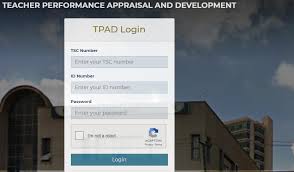
1. Once you have created a TPAD 2 Account, you can proceed to log in by entering your TSC Number, ID number and Password in the provided spaces then click on the login tab.

In case you lost your password, click on the tab labelled “Forgot Password” to reset it.

2. If you succeed to log in, you will be redirected to your dashboard.

3. Survey it quickly for “To do” or “Accomplished” Tasks at the top left corner of your device. If you are using a mobile phone, your tasks will be displayed  in the form of three parallel lines on the top left corner.

4. Click in the Tasks and proceed to “Self-Appraisals” tab.

5. Select “Self-assessment” then “Create New Appraisal”

6. Choose the year and term and click on “On Duty” under the Eligibility column.

7. To this point, you would have created “My Appraisals.” Proceed to the “Action” column to appraise yourself.

8. Proceed to “Appraisal”  and fill the required data/ fields.

9. Start with the Teaching Standards, Learners’ Progress and Lesson Attendance.

10. Select the menu items, one at a time to update data.

11. Click on the standard tab and select either primary or secondary under the standards by institution tab.

12. Edut scores for each teaching standard by clicking on the new rating tab.

13. Confirm your scores then click on the “Submit” button to complete the process.

Note: you might experience some delays since the portal is currently being accessed by many teachers. You therefore need the patience of a cobra and resilience to beat the deadline.

If you have not created your tpad2 account, you can do so by following this procedure

New TSC TPAD Tool

In November 2019, the Commission introduced a user-friendly TPAD tool, commonly referred to as TPAD2.


TSC tpad2 Creation/Activation, login, URL: an ultimate guide on how to easily create, activate, login and use the latest user-friendly TPAD2 url link (https://35.229.67.130/auth/login)

This article provides reliable information on how to create, activate or log onto the new TSC TPAD2 portal, the latest TSC TPAD2 user-friendly URL link, TPAD Process, and new TSC TPAD teaching standards

Section 52 of the TSC Code of regulations for requires teachers to actively take part in the Teacher performance and appraisal development processes.

These include: Creating a TSC TPAD Portal, setting teaching/ learning targets on a termly basis, and working towards achieving them.

How to easily Create/Activate your TSC TPAD2 Portal using the new TSC tpad2 URL account creation link

Note: The new TSC TPAD 2 log in access link/ address is https://35.229.67.130/auth/login


How to register and log into your new TPAD2 login portal


Click on this link https://35.229.67.130/auth/create_account to access the new TSC TPAD2 registration portal


Create your new TSC TPAD2 account by first filling in the required data that is your TSC number, Phone number, ID number, Email address, and password.


After filling in the above details, click on the tab labeled “Create Account” to create your new TSC TPAD2 account.


Once your new TSC TPAD2 account is created, it will automatically get logged onto.


In the next window, fill in the following details: level of education and subject combinations for instance English and Literature then click on “Submit.”


Now your TSC TPAD 2 login account is ready for use, proceed to log in by clicking on the tab labeled “Proceed to log in.”


Requirements for TSC TPAD2 portal account

Teachers are expected to provide the following details when logging onto their new TSC TPAD2 accounts:

  1. TSC number
  2. ID number
  3. Log in Password


TPAD Process: simplified steps

  1. Roll out of appraisal calendar
  2. Setting of targets
  3. Working towards meeting the set targets and gathering evidence on the various achievements made
  4. Self-appraisal based on set standards and competencies
  5. Appraisal rating by the appraiser based on the evidence collected
  6. Meeting between appraiser and appraisal for agreed rating based on the evidence gathered
  7. Identification of gaps
  8. Development of teacher support and performance development
  9. Implementation of teacher support and performance development

New TSC TPAD Checklist

BELOW IS A COMPLETE CHECKLIST OF ALL TSC PROFESSIONAL DOCUMENTS FOR THE NEW TSC TPAD TOOL

1. Current Personal Timetable
2. Syllabi
3. Updated lesson plans
4. Updated lesson notes
5. Updated records of work checked on a weekly basis
6. Approved schemes of work
7. Exam analysis per subject (Continuous and summative assessment results)
8. Marked learners’ exercise books
9. Co-curricular and team-building activity records
10. Learners’ Guidance and Counselling records
11. Copies of staff and departmental meetings’ minutes
12. TPAD records
13.Individualized Educational Programmes, IEP records
14. Professional Development records
15. Lesson observation records
16. Involvement with the community and other stakeholders
17. ICT integration in the teaching/ learning process
18. Teaching aids


TPAD: TSC Directs Teachers to Update their TPAD Immediately

TSC Directs Teachers to Update their TPAD Immediately

The Teachers Service Commission, TSC now wants teachers to open and fill their Teacher Performance Appraisal Development, TPAD assessment tools immediately since this data will be required soon.

In a message sent to school Principals and heads, the Commission wants practicing teachers to provide information on their TPAD tools immediately.

“Hi colleagues. Please ensure that your teachers have opened and maintained their tpads account. You should start this exercise now. Update is going to be requested soon,” reads one of the messages at our disposal.

New TSC TPAD Tool

In November 2019, the Commission introduced a user-friendly TPAD tool, commonly referred to as TPAD2.

Two teachers from every school were trained on how to create and log into the new TSC TPAD2 account.

For those who may not be well versed with the procedure, below is a simplified guide and the official TSC TPAD2 creation or activation link

TSC tpad2 Creation/Activation, login, URL: an ultimate guide on how to easily create, activate, login and use the latest user-friendly TPAD2 url link (https://35.229.67.130/auth/login)

This article provides reliable information on how to create, activate or log onto the new TSC TPAD2 portal, the latest TSC TPAD2 user-friendly URL link, TPAD Process, and new TSC TPAD teaching standards

Section 52 of the TSC Code of regulations for requires teachers to actively take part in the Teacher performance and appraisal development processes.

These include: Creating a TSC TPAD Portal, setting teaching/ learning targets on a termly basis, and working towards achieving them.

How to easily Create/Activate your TSC TPAD2 Portal using the new TSC tpad2 URL account creation link

Note: The new TSC TPAD 2 log in access link/ address is https://35.229.67.130/auth/login


How to register and log into your new TPAD2 login portal


Click on this link https://35.229.67.130/auth/create_account to access the new TSC TPAD2 registration portal


Create your new TSC TPAD2 account by first filling in the required data that is your TSC number, Phone number, ID number, Email address, and password.


After filling in the above details, click on the tab labeled “Create Account” to create your new TSC TPAD2 account.


Once your new TSC TPAD2 account is created, it will automatically get logged onto.


In the next window, fill in the following details: level of education and subject combinations for instance English and Literature then click on “Submit.”


Now your TSC TPAD 2 login account is ready for use, proceed to log in by clicking on the tab labeled “Proceed to log in.”


Requirements for TSC TPAD2 portal account

Teachers are expected to provide the following details when logging onto their new TSC TPAD2 accounts:

  1. TSC number
  2. ID number
  3. Log in Password


Role of Appraiser and Appraisee in the new TSC Tpad

The above-mentioned roles are assumed by teachers at various capacities. The appraiser is expected to assess the development of a teacher in terms of curriculum delivery and award marks as per the guidelines provided.

The school head performs the following TPAD Roles:

Playing an oversight role in TPAD implementation by all teachers

Continuously monitoring and evaluating the appraisal process and compiling termly reports to be submitted to the sub-county education director for forwarding to the TSC.

Offering relevant feedback regarding TPAD implementation for example knowledge gaps

Appraising the deputy head (heads) at the school level

Counter-signing TPAD documents for all teachers within the school


New roles of deputy heads in the New TSC TPAD

Updating lesson attendance for all teachers

Arbitrating for teachers

Scheduling meetings and appraising Heads of Departments and curriculum masters

Counter-signing registers on a weekly basis


TPAD Process: simplified steps

  1. Roll out of appraisal calendar
  2. Setting of targets
  3. Working towards meeting the set targets and gathering evidence on the various achievements made
  4. Self-appraisal based on set standards and competencies
  5. Appraisal rating by the appraiser based on the evidence collected
  6. Meeting between appraiser and appraisal for agreed rating based on the evidence gathered
  7. Identification of gaps
  8. Development of teacher support and performance development
  9. Implementation of teacher support and performance development

New TSC TPAD Checklist

BELOW IS A COMPLETE CHECKLIST OF ALL TSC PROFESSIONAL DOCUMENTS FOR THE NEW TSC TPAD TOOL

1. Current Personal Timetable
2. Syllabi
3. Updated lesson plans
4. Updated lesson notes
5. Updated records of work checked on a weekly basis
6. Approved schemes of work
7. Exam analysis per subject (Continuous and summative assessment results)
8. Marked learners’ exercise books
9. Co-curricular and team-building activity records
10. Learners’ Guidance and Counselling records
11. Copies of staff and departmental meetings’ minutes
12. TPAD records
13.Individualized Educational Programmes, IEP records
14. Professional Development records
15. Lesson observation records
16. Involvement with the community and other stakeholders
17. ICT integration in the teaching/ learning process
18. Teaching aids


TSC TPAD2 YOU CAN NOW CREATE YOUR NEW TSC TPAD 2 ACCOUNT BY FOLLOWING THE PROCEDURE BELOW

NEW TSC TPAD: A SIMPLIFIED GUIDE ON HOW TO CREATE AND USE THE NEW TSC TPAD LOG IN PORTAL FOR ALL TSC-EMPLOYED  TEACHERS

HOW TO CREATE AND USE THE NEW TSC TEACHER PERFORMANCE APPRAISAL AND DEVELOPMENT (TPAD 2)

Have you created your new TPAD 2 tool? In case you haven’t, worry no more since we have it all lined up for you.

The Teachers Service Commission has come up with a new simplified TPAD 2 tool which will make it easier for TSC employed teachers to upload their data into the TSC online system.

EXTERNAL LINKS WITH RELATED CONTENT

https://educationnewshub.co.ke/how-to-create-and-use-the-new-tpad-2-portal-https-tpad2-tsc-go-ke-for-tsc-teachers-ultimate-guide/

https://educationnewshub.co.ke/the-new-teachers-performance-appraisal-form-new-tpad-2-form-free-download-and-guide/

One of the most outstanding changes in the new TSC TPAD2 tool is the clear demarcation of the roles of teachers, deputies and heads.

This, therefore, means that there are three different portals for teachers, deputies and heads.

ROLES OF TEACHERS IN THE NEW TSC TPAD TOOL

Each TSC employed teacher in Kenya will be expected to do a self-appraisal and upload their data online.

ROLES OF DEPUTY HEADS IN THE NEW TSC TPAD 2 TOOL

  1. Updating teachers’ weekly attendance registers
  2. Observing and appraising all Heads of Departments and classroom teachers through planned appraisal meetings.


ROLES OF HEADS IN THE NEW TSC TPAD 2 TOOL

  1. Registering all teachers on the Teachers Management Information System, TMIS.
  2. Activating teachers on TPAD.
  3. Training teachers on the new TPAD tool
  4. Appraising the deputy or deputies in the school.
  5. Arbitrating and countersigning all appraisal forms within the institution.
  6. Removing teachers who have exited service or been transferred to other institutions.
  7. Overseeing the entire appraisal process at the school level.

HOW TO CREATE THE NEW TSC TPAD ACCOUNT- TPAD 2

Below are simplified steps on how to create the new TSC TPAD account

  1. Log into the TSC online system then click on the new TPAD creation portal https://tpad2.tsc.go.ke/auth/create-account.
  2. Complete the following fields by providing accurate information

    NEW TSC TPAD: A SIMPLIFIED GUIDE ON HOW TO CREATE AND USE THE NEW TSC TPAD LOG IN PORTAL FOR ALL TSC-EMPLOYED  TEACHERS. IMAGE COURTESY
  3. Click on “Create account.”
  4. If the operation was successful, then you will be notified through a success SMS on your phone a few moments later.
  5. Verify your Token by entering the code received via SMS after clicking on the “Verify Token” tab to complete the account creation process.

NEW TSC TPAD

TEACHER- FRIENDLY TPAD TOOL!

RELIEF FOR TEACHERS AS TSC UNVEILS A NEW TEACHER- FRIENDLY TPAD

Teachers in Kenya now have got reason to smile following the release of a new simplified TPAD tool by the Teachers Service Commission.

EXTERNAL LINKS WITH RELATED CONTENT

https://educationnewshub.co.ke/deadline-for-filing-2019-term-3-tpad-data-by-tsc-teachers-tsc-latest-news/

https://tpad2.tsc.go.ke/auth/login

The former TPAD tool has been done away with due to its bulky nature. Moreover, it gave the teachers difficulty in terms of accessibility. The new tool is however less bulky and less detailed. Check out the details below.

The teachers’ service commission (TSC) new TPAD appraisal system is aimed at capturing teachers’ manual data. Here is the link: tpad2tsc.go.ke

The tool has got a reduced number of teaching standards from the previous 7 to 5 on its online portal. The commission, therefore, expects all teachers to upload their termly appraisals via the link provided above.

This move follows extensive consultations with various stakeholders which include teachers, school heads, Sub- County and County directors, curriculum support officers KTCPA and KESSHA on effective TPAD implementation.

The Teachers Service Commission has been monitoring TPAD and PC implementation since January 2016. The monitoring process is usually facilitated by county education offices. All Kenyan learning institutions are assessed and monitored continuously on a termly basis. This monitoring and evaluation is part of the performance contract signed by all county directors.

TEACHER-FRIENDLY TPAD TOOLS
For easier implementation, the Teachers Service Commission has customized its TPAD for teachers serving the following levels: primary, secondary, special needs schools and post-secondary institutions.

Although the teaching standards cut across all the levels, performance indicators and evidence greatly differ from one institution to another.

REVISED TEACHING STANDARDS
The TPAD teaching standards have been revised as follows:

Part A: INSTRUCTIONAL DELIVERY now consists of:
a. PROFESSIONAL KNOWLEDGE AND PRACTICE
b. COMPREHENSIVE LEARNING ENVIRONMENT
c. TEACHER PROFESSIONAL DEVELOPMENT

Part B: TEACHER CONDUCT AND PROFESSIONALISM has one part:
d. TEACHER CONDUCT AND PROFESSIONALISM

Part c: COMMUNITY OF PRACTICE which also has one part:
e. PARTICIPATION IN PROFESSIONAL LEARNING COMMUNITY

THE TPAD PROCESS
It consists of 8 steps

1. Developing an appraiser calendar
2. Setting of termly targets
3. Implementing the targets set and evidence gathering
4. Self- appraisal based on various competencies and teaching standards
5. Appraiser rating based on the evidence given
6. Appraiser-Appraisee meeting which involves questions and evidence
7. Identifying teaching gaps
8. Implementing teacher support and development

REVISED T-PAD ONLINE SYSTEM
There are modifications in the new TPAD online system. The system has got one pack for three tools: TPAD, PC and TPD. Contrary to the old system, the new one is more superior and teacher-friendly.

It consists of the following:
1. Interaction
2. Adequate features of security
3. TPAD portal
4. Reports
5. Inbuilt self –monitoring
6. Real-time feedback
7. Performance Contracts for heads
8. Institutional-based needs
9. Instructional supervision planning
10. Audit trails on who did what
11. Accessibility-it can be accessed while online and offline

N/B: Ensure that your sub-county director activates your name before you try logging into the system.