- Have you created your new account on the new Teacher Performance Appraisal and Development (TPAD 2) and you are wondering how to proceed with your appraisal process? Well, here is a guide to enable all teachers employed by the Teachers Service Commission, TSC, to do both self appraisals and appraise those under them.
After successfully creating your new TPAD-2 account, next you need to carry out a self appraisal. This is a simple process that can be achieved by following the steps below:
-
- log into your account by visiting this link; https://tpad2.tsc.go.ke/auth/login. Enter your TSC Number, ID Number and Password then click ‘Login’. (In an event that you can not recall your password, click the ‘Forgot password’ tab to reset it.
- On successful login, you will be redirected to your dashboard. This shows a summary of your ‘to do’ (pending) and accomplished tasks.
-
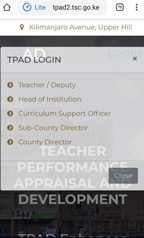
The new TPAD 2 login window. - To start off your appraisal, click the menu button (at the top left corner; will be shown as three parallel lines if using a mobile phone). Then, select ‘Self appraisals’ followed by ‘self assessment’.
- Now, click ‘Create new appraisal’. Select the Year, Term and ‘on duty’ under eligibility.
- Your newly created appraisals will be listed under ‘My appraisals’.
- Under the ‘action’ column, select ‘proceed to appraisal’ to complete your appraisal by filling in the required information/ fields.
- Record Teaching Standards, Learners Progress and Lesson Attendance. Choose the menu items (standards; one at a time), click ‘Update standard’ and in the next window click the ‘choose standard’ tab. Under the ‘Select Standards by Institution’ choose either Primary & Secondary schools or SNE (Special Needs Education) Primary & Secondary schools.
- Click ‘proceed to standard’. Edit the marks/ data for each of the listed standards by clicking the ‘new rating’ tab under the ‘action’ column.
- Once all the areas have been correctly filled out, click the ‘view/ submit for Appraisal’ tab.
- The whole process requires some bit of patience and precision.
- You can not move to the next step/ area unless the current one is updated.
SEE ALSO;
- Latest TPAD guide for TSC Teachers; How to create an account at http://tpad2.tsc.go.ke/
- New TPAD 2 access link: TSC changes link for New TPAD 2 log in (http://35.229.67.130/auth/login)
- How to fill weekly lesson attendance data for all teachers in the new TPAD 2 online system: TSC Guides
- A collection of new TPAD 2 forms.
- How to create and use the new TPAD 2 account.
- New TPAD 2 termly appraisal, calendar of activities and planning guide
- New TPAD 2: A checklist of professional documents to be maintained by all teachers: free form download
- The new Teachers Performance Appraisal form: new TPAD 2 form free download and guide
- New TPAD 2 (http://tpad2.tsc.go.ke/) forms free download: Collection of all TPAD forms
- TSC Lesson Observation Form for teachers: New TPAD 2 free forms downloads
- New TPAD 2 Lesson Recovery Schedule form: Free Lesson Recovery Form
- A checklist of all Professional Documents to be prepared by Teachers in the New TPAD 2: Free Checklist Form Download
- New TPAD 2 Lesson Attendance Summary Sheet: Free Form Download
- The new Teachers’ Performance Appraisal Form (New TPAD 2 Form) Free download and guide
-

Best Kenyan News Portal, Keeping You Updated.