Did you know that creating your new TPAD 2 account in the Teachers Service Commission, TSC, portal is a simple process? Well, creating your own account at the Teacher Performance Appraisal and Development (TPAD 2) system is one of the easiest processes. By creating your TPAD 2 account, you will be able to file your appraisal data and appraise others.
SIMPLIFIED GUIDE FOR CREATING AND USING A TPAD 2 ACCOUNT
The process of creating a new account has, now, been simplified and shortened. For instance, there is no longer a requirement for SMS verification and the earlier stringent security checks. It is important to note that the TSC portal may be down some times., keep on trying and if possible try accessing the portal during off peak hours.
Here is a simplified procedure:
- Visit the new TPAD 2 system by using the URL; https://tpad2.tsc.go.ke/auth/create_account
-
You will get a window with fields as shown, below;
TPAD Account
- Fill in your details, correctly and then click ‘Create Account’.
- In the next window, you will be expected to update your teaching subjects/ roles and academic details. If done properly, then you will see a success message.
How to log into your account.
Logging into your account is pretty easy. all that you need is your TSC Number, ID Number and Password.
Now visit, https://tpad2.tsc.go.ke/ to log in.
HOW TO RESET YOUR PASSWORD
Since you are human, you may sometimes just forget your TPAD 2 account. Do not sweat on this unfortunate happening. In case you forget your password, you can reset it by following the steps below:
- Click on this link to access the password recovery portal; https://35.229.67.130/auth/forgot_password
- Enter your TSC Number and TSC Number. Next, click on ‘Recover Password’.
ROLES OF THE TEACHERS IN THE NEW TPAD
Each teacher will be expected to do a self appraisal in the various areas, create an appraisal and upload the data online.
ROLES OF THE PRINCIPALS IN THE NEW TPAD
The school Head has been assigned the following roles in the new TPAD:
- Ensuring all the teachers have been captured on the Teachers Management Information System, TMIS, and Activating all teachers on TPAD.
- Training the New teachers and all teachers on the new TPAD.
- Expunging teachers who have left an institution from both TMIS and TPAD.
- Overseeing the whole appraisal process at school level.
- Appraise the Deputy Head/ Principal at school level. This should be done via scheduled appraisal meetings.
- Arbitrate and countersign all appraisal forms for teachers; including that of the Deputy Head.
FOR A COMPLETE GUIDE TO ALL SCHOOLS IN KENYA CLICK ON THE LINK BELOW;
Here are links to the most important news portals:
- KUCCPS News Portal
- TSC News Portal
- Universities and Colleges News Portal
- Helb News Portal
- KNEC News Portal
- KSSSA News Portal
- Schools News Portal
- Free Teaching Resources and Revision Materials
ROLES OF THE DEPUTY HEAD/ PRINCIPAL IN THE NEW TPAD
The Deputy Head of Institution has been assigned the following responsibilities:
- Updating teachers’ weekly lesson attendance registers.
- Appraise all Heads of Departments (HODs) and Classroom Teachers via scheduled Appraisal meetings.
- Observing all Heads of Departments (HODs) and Classroom Teachers as they execute their duties.
THE NEW TPAD TOOL
Whereas the old TPAD had seven (7) areas, the new TPAD tool/ form has five (5) standards/ areas:
- Professional Knowledge and Practice
- Comprehensive Learning Environment
- Teacher Professional Development
- Teacher Conduct and Professionalism
- Participation in Professional Learning Community
TEACHERS’ PORTAL
- Self Appraisal with sections; Lesson Observation and Self Assessment.
- Teacher Professional Development.
To carry-out Self Appraisal;
- Click on Self Assessment
- Followed by Create New Appraisal.
- Enter Appraisal Details: Year, Term.
- Click on ‘Save Appraisal’ then ‘Close’.
THE DEPUTY HEAD’S PORTAL
This portal contains such details as:
- Self Appraisal; Lesson Observation, Self Assessment
- Appraiser Appraisals; Pending Appraisals, Scheduled Appraisal Meetings, Weekly Lesson Observation..
- Teacher Professional Development, TPD.
- Appraisal Reports: Standard reports, PM Based Reports…
THE HEAD OF INSTITUTION’S PORTAL
The Head of Head of Institution’s Portal has the following six (6) areas:
- Appraisals; Self Appraisal, Appraiser Appraisal and Institution’s Appraisals.
- Calendar of Activities: TPAD Calendar and PC Calendar
- TPD: TPD modules, TPAD TPD and Institution TPD
- Performance Contracting,PC
- Institution Set Up: Manage Teachers, Incoming Teachers, Manage Institutions and School Performance.
- Reports: TPD Reports, TPD Summaries, Demographic reports, Lesson Attendance Reports, Appraisal Reports, Appraisal Based TPD Reports.
THE NEW APPRAISAL FORM FREE DOWNLOAD.
Click on the link below to download the new TPAD 2 form;
Also read:
- All TSC services online portals and how to log in
- TSC TPAD data upload deadline
- Complete guide to the new TSC TPAD portal
- TSC: Full details on the newly established grades for teachers
- TSC: Designation codes for all teacher job groups
- TSC Grades and qualifications/ requirements for various administrative positions in schools
- TSC: Details on the current all 36 Teacher job groups/ grades
- TSC: Requirements, appointment and responsibilities of Principals
- All what you need to know and carry to a TSC teacher recruitment interview
- TSC: Requirements, responsibilities and appointment of Deputy Principals
HOW TO FILL DATA INTO THE ONLINE TPAD FORMS.
- log into your account by visiting this link; https://tpad2.tsc.go.ke/auth/login. Enter your TSC Number, ID Number and Password then click ‘Login’. (In an event that you can not recall your password, click the ‘Forgot password’ tab to reset it.
- On successful login, you will be redirected to your dashboard. This shows a summary of your ‘to do’ (pending) and accomplished tasks.
-
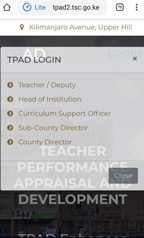
The new TPAD 2 login window.
-
- To start off your appraisal, click the menu button (at the top left corner; will be shown as three parallel lines if using a mobile phone). Then, select ‘Self appraisals’ followed by ‘self assessment’.
- Now, click ‘Create new appraisal’. Select the Year, Term and ‘on duty’ under eligibility.
- Your newly created appraisals will be listed under ‘My appraisals’.
- Under the ‘action’ column, select ‘proceed to appraisal’ to complete your appraisal by filling in the required information/ fields.
- Record Teaching Standards, Learners Progress and Lesson Attendance. Choose the menu items (standards; one at a time), click ‘Update standard’ and in the next window click the ‘choose standard’ tab. Under the ‘Select Standards by Institution’ choose either Primary & Secondary schools or SNE (Special Needs Education) Primary & Secondary schools.
- Click ‘proceed to standard’. Edit the marks/ data for each of the listed standards by clicking the ‘new rating’ tab under the ‘action’ column.
- Once all the areas have been correctly filled out, click the ‘view/ submit for Appraisal’ tab.
- The whole process requires some bit of patience and precision.
- You can not move to the next step/ area unless the current one is updated.
ITEMS IN THE NEW CHECKLIST FORM.
The commission expects teachers to prepare and maintain a number of TPAD documents. The following documents must be prepared, used, updated and maintained at all times by the teachers:
- Current Personal Timetable/training schedule
- Syllabi /course outline/ curriculum design.
- Approved Schemes of work/work plans.
- Updated Lesson plans/facilitators guide.
- Updated Lesson notes/presentation notes.
- Records of work/sessions/activities checked weekly.
- Examination analysis by subject (national and internal)/ Assessment records/staff training indices records
- Marked/checked learners work exercise books/training reports/back to office reports
- Co-curricular/team building activity records.
- Learners’/trainees conduct and behaviour records and guidance and counseling records.
- Copies of subject/programmes/departmental meeting minutes.
- Teacher Performance Appraisal and Development records.
- Individualized Educational Programmes (IEP records)
- Professional development activities
- Lesson observation Records
- Records of community and stakeholders involvement
- Evidence of integration of ICT in teaching/learning
- Preparation of teaching aids using locally available resource materials
These items are checked by the appraiser thrice in a term; on monthly basis. The Head of Institution shall sign then sign the checklist at the end of each term.
Information filled in the ‘Checklist of Professional Documents to be maintained by Teachers’ Form will be used by the appraiser for rating the teacher in the Teacher Performance Appraisal and Development (TPAD) standard/ section number one on Professional Knowledge and Practice.
To download the form click on the link below: