

KNEC Examiners Portal; How to log into, Register, Capture and Submit your Details in the KNEC Portal, for KNEC Examiners Only
KNEC PORTAL: HOW TO EASILY ACCESS, REGISTER, CAPTURE AND SUBMIT DETAILS
For first time users

First time/ new users are the contracted professionals who have never registered themselves online via the KNEC contracted professionals’ system.
To register online, kindly use the following simplified steps:
(a) Visit the KNEC contracted professionals’ web: https://cp2.knec.ac.ke
and follow the following steps to register in the platform and their
submit details.
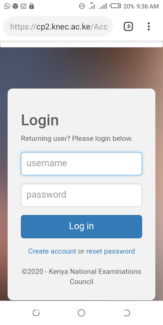
(b) Use the link/ URL https://cp2.knec.ac.ke/ to access the contracted
professional website.
You can do so by typing the link on the address bar of any browser (Firefox, internet explorer, Google
chrome etc.) or by clicking on the link. The address directs the user to the online system shown below;
How to create a KNEC CP2 Account; Procedure
1. Enter your mobile number as shown in figure 2 e.g. 254722645678
2. To confirm, enter the same number.
3. Click the link: Create Account. You will receive a message confirming that the login details (user name and password) as well as the link to access the CP2 system have been sent to the phone number used for creating the account.
4. Confirm receipt of the login credentials from the phone number used to create the account.
5. Refer to the user manual for comprehensive guidelines on registration, system access, filling in details, application for a vacancy and submission of your details.
For existing users
1.Enter your user name and password in the required spaces.
2 Click on the tab labelled “Login” to open the contracted professionals’ home page for filling in missing details,
updating existing details, application for a vacancy and online submission.
To update/ edit details
1. Click on the link Profile for the display of existing details previously
captured in the system for viewing, editing
and updating if need be.
2. Click the specific link to view specific details e.g. Personal Information,
Work Experience and Qualification
3. Click Personal Information link to view the contracted professional bio data.
Click the Edit link to enable editing and updating of the profile details displayed.
4. Click Work Experience link to view the contracted professional work experience details. Click the Edit link to enable editing and updating of the work experience details displayed.
5. Click Qualification link to view the contracted professional academic and professional qualification details.
Click the Edit link to enable editing and updating of the qualification details displayed.
6. For any additional information e.g. new work station, qualifications
etc., Click the link Add to generate the interface for capturing new
details


