• Home
  • Advertise with Us
  • SCHOOLS IN KENYA PORTAL
  • KNEC NEWS
  • Education News
  • TSC
  • COLLEGES AND UNIVERSITIES IN KENYA
  • KNEC News Portal
  • Free Education Resources Centre
News Pro
No Result
View All Result
No Result
View All Result
News Pro
No Result
View All Result

KNEC cp2 Examiners Portal: How to log onto, Register, Capture and Submit your Details in the KNEC Portal, for contracted KNEC Examiners Only

by News Pro Team
February 21, 2026
in How To, KNEC NEWS
0
2024-2025 KNEC payment rates for Center Managers, Supervisors, and Invigilators; Call for Knec CP2 Application Following Portal Activation

KNEC Examiners Portal; How to log into, Register, Capture and Submit your Details in the KNEC  Portal, for KNEC Examiners Only
KNEC cp2 Examiners Portal: How to log onto, Register, Capture and Submit your Details in the KNEC Portal, for contracted KNEC Examiners Only


KNEC PORTAL: HOW TO EASILY ACCESS, REGISTER, CAPTURE AND SUBMIT DETAILS

For first time users

RelatedPosts

KCSE 2026 Project, Practical Exams Materials & Marking Schemes {Free PDF Downloads}

Knec Registration of candidates for 2026 KJSEA {Official Guide}

Turkana Girls National School KCSE 2021/2022 Results-Performance Analysis and Ranking by Knec  in 2021/2022; School Mean Score-7.88, Number of As, Grade Summary, and Distribution & Transition Rate to Universities and Colleges in 2022

KNEC cp2 Examiners Portal: How to log onto, Register, Capture and Submit your Details in the KNEC Portal, for contracted KNEC Examiners Only

First time/ new users are the contracted professionals who have never registered themselves online via the KNEC contracted professionals’ system.

To register online, kindly use the following simplified steps:

(a) Visit the KNEC contracted professionals’ web: https://cp2.knec.ac.ke
and follow the following steps to register in the platform and their
submit details.

(b) Use the link/ URL https://cp2.knec.ac.ke/ to access the contracted
professional website.

You can do so by typing the link on the address bar of any browser (Firefox, internet explorer, Google
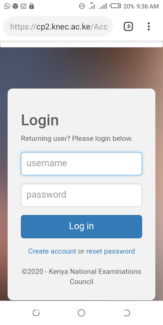
chrome etc.) or by clicking on the link. The address directs the user to the online system shown below;

How to create a KNEC CP2 Account; Procedure

1. Enter your mobile number as shown in figure 2 e.g. 254722645678

2. To confirm, enter the same number.

3. Click the link: Create Account. You will receive a message confirming that the login details (user name and password) as well as the link to access the CP2 system have been sent to the phone number used for creating the account.

4. Confirm receipt of the login credentials from the phone number used to create the account.

5. Refer to the user manual for comprehensive guidelines on registration, system access, filling in details, application for a vacancy and submission of your details.

For existing users

1.Enter your user name and password in the required spaces.

KNEC cp2 Examiners Portal: How to log onto, Register, Capture and Submit your Details in the KNEC Portal, for contracted KNEC Examiners Only

2 Click on  the tab labelled “Login” to open the contracted professionals’ home page for filling in missing details,
updating existing details, application for a vacancy and online submission.

To update/ edit details

1. Click on the link Profile for the display of existing details previously
captured in the system for viewing, editing
and updating if need be.

2. Click the specific link to view specific details e.g. Personal Information,
Work Experience and Qualification

3. Click Personal Information link to view the contracted professional bio data.

Click the Edit link to enable editing and updating of the profile details displayed.

4. Click Work Experience link to view the contracted professional work experience details. Click the Edit link to enable editing and updating of the work experience details displayed.

5. Click Qualification link to view the contracted professional academic and professional qualification details.

Click the Edit link to enable editing and updating of the qualification details displayed.

6. For any additional information e.g. new work station, qualifications
etc., Click the link Add to generate the interface for capturing new
details


Tags: KNEC cp2 account log inKNEC cp2 portal account CreationKNEC cp2 portal for ExaminersKNEC portal
Previous Post

COUNTY SECONDARY SCHOOLS IN BUSIA COUNTY

Next Post

Diploma in Primary Teacher Education, DPTE Intake 2021/2022; Second Intake for Diploma in Primary Teacher Education, DPTE and Early Childhood Teacher Education, ECDE Postponed

News Pro Team

Related Posts

KNEC NEWS

KCSE 2026 Project, Practical Exams Materials & Marking Schemes {Free PDF Downloads}

March 11, 2026
Knec Portals login links
KNEC NEWS

Knec Registration of candidates for 2026 KJSEA {Official Guide}

March 3, 2026
Lugulu Girls High KCSE 2022/2023 Results-Performance Analysis and Ranking by Knec  in 2022/2023; School Mean Score-9.4814, Number of As, Grade Summary, and Distribution & Transition Rate to Universities and Colleges in 2022/2023
KNEC NEWS

Lugulu Girls 2020 KCSE Results  and 2021 Form One Admission; Official KCSE 2020 Results Ranking For Lugulu Girls High School, Located in Bungoma County- Western Region

February 21, 2026
KCSE 2024-2025 Results of Siaya County; Top 100 Schools and Students
Breaking News

Maranda Boys High KCSE 2024-2025 Results-Performance Analysis and Ranking by Knec in 2025; School Mean Score, Number of As (56), A-(150) Grade Summary, and Distribution & Transition Rate to Universities and Colleges in 2025

February 21, 2026
Next Post
Kisii County 2024/2025 TSC Recruitment Vacancies per County: List of TSC Teaching Posts for Secondary School Teachers in Kisii County

TSC Internship Merit List 2023/2024

Leave a Reply Cancel reply

Your email address will not be published. Required fields are marked *

2026 Popular News

  • Home
  • Advertise with Us
  • SCHOOLS IN KENYA PORTAL
  • KNEC NEWS
  • Education News
  • TSC
  • COLLEGES AND UNIVERSITIES IN KENYA
  • KNEC News Portal
  • Free Education Resources Centre

© 2026 JNews - Premium WordPress news & magazine theme by Jegtheme.

No Result
View All Result
  • Advertise with Us
  • Homepage

© 2026 JNews - Premium WordPress news & magazine theme by Jegtheme.