TSC TPAY; How to Resolve Glaring Challenges Experienced by Teachers while Validating their TSC TPAY Details Online

Are you stuck and cannot simply validate your TSC Tpay account details? The Teachers Service Commission TSC recently directed all teachers currently serving on internship , permanent and pensionable Career Progression Guidelines, CPGs to validate their mobile numbers and e-mails on the Tpay System Online. Click Here to access the latest TSC News Today.
The TSC Tpay authentication process is a two step simplified procedure. Unfortunately, most teachers have been trying to update their emails without success.
To date, teachers have been able to upload their passport size photos and validate their mobile phone numbers since they can easily retrieve the One Time Pin, OTP on their messages but they cannot validate their microsoft outlook e-mails since they are unaware of the whereabouts of their one time pin for validating their emails.

In this write-up, our media team endeavours to provide a simplified version of how to validate TSC Tpay Data or details online especially when it comes to validating your email.
How to easily validate TSC TPay Microsoft Outlook Email Online
Kindly note that to easily access all TSC notifications on your Microsoft outlook email, you have to download the Microsoft outlook app via your app store or play store first.
To download the Microsoft outlook office 365 app;
Access your mobile phone app store or play store after connecting your phone to the internet.

On the Search button, type the keywords Microsoft Outlook app.
Surf the options until you see an app like the one shown on the image below
Click on it and hit the install button.
The app will automatically get downloaded to your mobile phone.
To retrieve the downloaded Microsoft outlook app, access your files. Click on apps and scroll until you see the app labeled Microsoft outlook.
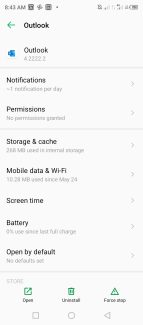
Click on the app and scroll downwards until you see the open tab. Once you hit the open tab, you will automatically access the notification from TSC containing your OTP verification code for your Microsoft Outlook email and other TSC Circulars.


See the images above.
Note that you cannot retrieve your OTP verification code without requesting for it on the TSC Tpay portal online first.
To request for your OTP verification codes for both the mobile phone number and the Microsoft outlook email, access the official TSC Tpay online portal by clicking here.
Enter your TSC number, National Identity number then your Tpay password-the one you use to access your TSC payslip online.
A notification directing you to update your Tpay details will pop up immediately you are granted access to the TSC Tpay system.
Click on the tab labelled “Update my details.”
Upload a passport sized photo.
Ensure that you crop the photo to fit the minute space provided for the photo.
Scroll downwards and click on the tab prompting you to validate your phone number.
Enter your phone number then hit the verify button.
You will be notified to feed your one time pin verification code in the space provided.
To retrieve your OTP verification code for your phone number, access the messages tab on your phone.
Copy the OTP verification code and feed it to the space provided.
Proceed to verify your email by entering your email address provided by the Teachers Service Commission earlier which takes the format of your first name, followed by your surname then the last two digits of your tsc number@mwalimu.tsc.go.ke for example agnesteranki63@mwalimu.tsc.go.ke.
Next, enter your password. In case you have forgotten, click on the reset button and you will receive a verification code to reset your password.
Next, access the verification code for the email on the Microsoft outlook app as earlier illustrated above and feed it into the space provided to verify your email. This will mark the end of the two-step TSC Tpay verification process.