
• Home
  • Advertise with Us
  • SCHOOLS IN KENYA PORTAL
  • KNEC NEWS
  • Education News
  • TSC
  • COLLEGES AND UNIVERSITIES IN KENYA
  • KNEC News Portal
  • Free Education Resources Centre
News Pro
No Result
View All Result
No Result
View All Result
News Pro
No Result
View All Result

How to request for Grade 10 Senior School Placement Transfer {MoE Step-By-Step Guide}

by News Pro Team
February 21, 2026
in Education News
0
Grade 10 Placement Results Checking Online Portal.

Grade 10 Placement Results Checking Online Portal.

How to request for Grade 10 Senior School Placement Transfer {MoE Step-By-Step Guide}

Here is a step-by-step guide on how to apply for Grade 10 Senior School Placement Transfers online:

Placement System Junior School User Guide

Step 1. Open any browser and search for https://placement.education.go.ke. This link will take you to the landing page, like in the image below;

Grade 10 Placement Portal's Home Page.
Grade 10 Placement Portal’s Home Page.

Step 2. On the landing page, click on ” Log in and it will take you to this page
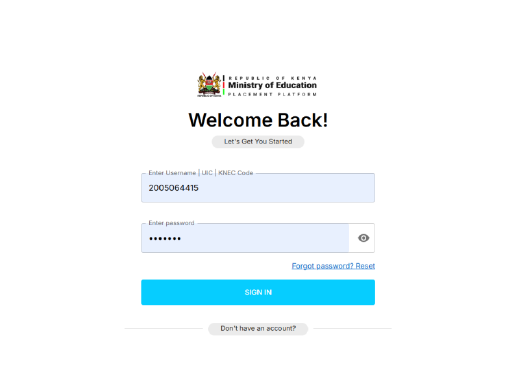
Grade 10 Placement Portal's Login Window.
Grade 10 Placement Portal’s Login Window.

Also read: Grade 10 Replacement dates and guidelines

Step 3. Type in the Junior School selection username and password. Please be keen here.

RelatedPosts

Haere are the Kenya Science & Engineering Fair (KSEF) Collated Results for 2026.

TSC Circular on Updating of data on registered teachers not currently employed by the Teachers Service Commission

Mwalimu National Sacco Loans & Repayment Schedule

Step 4. Then you will be prompted to fill in the Verification code shown above on that page.

Step 5. On the home page that is shown below, click on REQUEST TRANSFERS on the left side bar.

Grade 10 Placement Portal's transfer request page.
Grade 10 Placement Portal’s transfer request page.

Step 6. This action will avail all the Learners in your school and the senior school placed as shown in the image below.
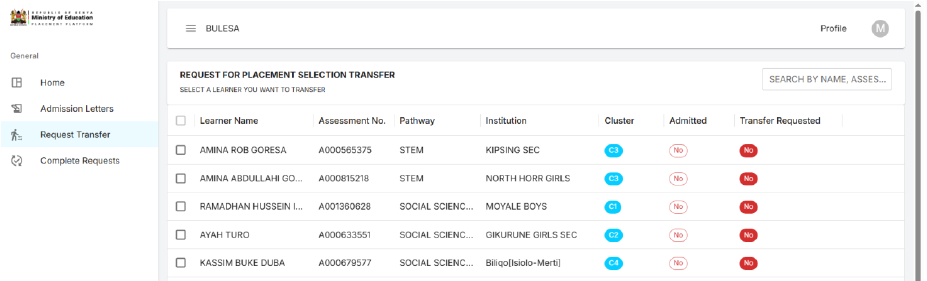
Grade 10 Placement Portal's transfer request page for leaner transfers
Grade 10 Placement Portal’s transfer request page for leaner transfers

Continue reading: Education Ministry Circular on Selection & Placement of Grade 10 Students {Latest}Step 7. Select the learner you wish to transfer, then click the next button at the far right bottom-most corner. The action will bring you to the next step, where you are expected to select the institution type.
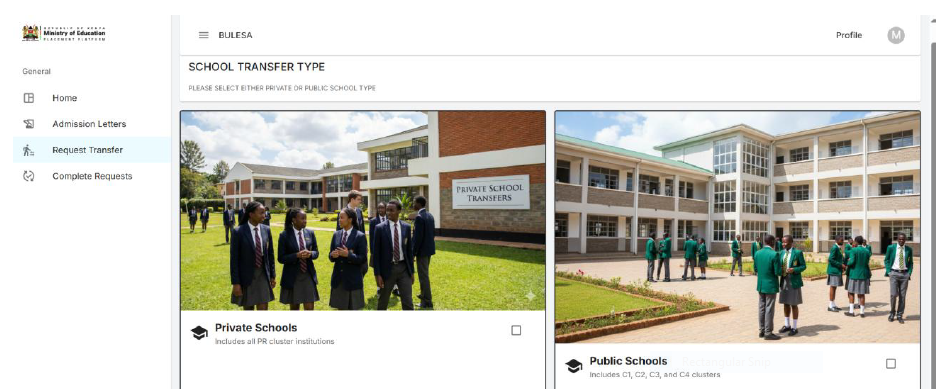
Grade 10 School Placement Transfer Page

Step 8. Select the institution type you wish to transfer to, either public or private, and click next. This action will navigate you to a section where you are expected to enter the reason for transfer.
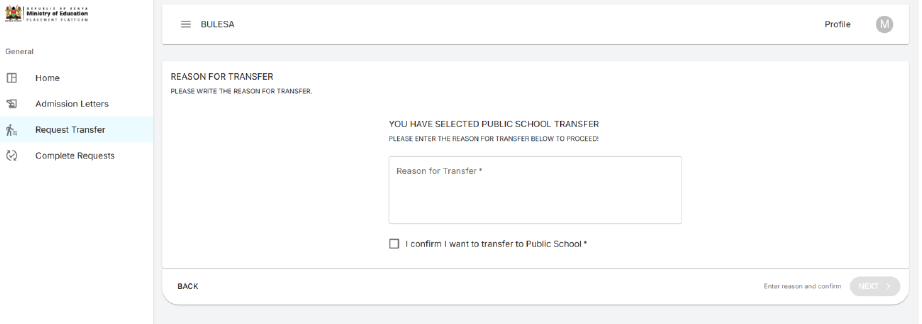
Window for Selecting the grade 10  institution type you wish to transfer to
Window for Selecting the grade 10 institution type you wish to transfer to

Step 9. On clicking the next button below this page, you will be navigated to a section where you are expected to select the pathway.

Grade 10 Pathway Selection window.

Step 10. Select the pathway and click next. This action will navigate you to the next page, where you select the subject combination.

Grade 10 Subject Selection Page.

You may also like: Grade 10 Placement: How to change placement school & requirements

Step 11. Select the subject combination and click next. This action brings you to the page where you are expected to select the school that you wish to transfer to.
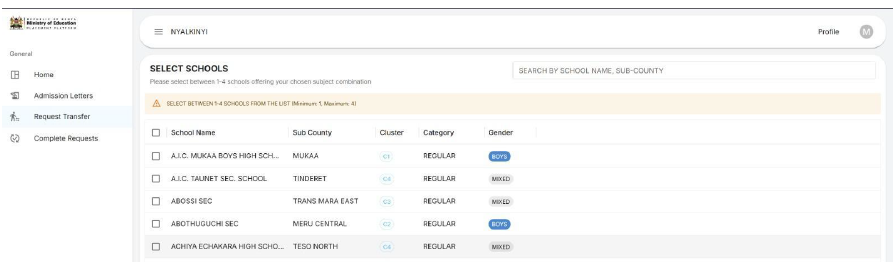
Select the subject combination and click next

Step 12: Select the school and click next. This will now navigate you to a page where you should confirm your transfer details.

Select the school and click next. This will now navigate you to a page where you should confirm your transfer details.

Step 13: Confirm your transfer details and click submit. Now the transfer request is complete.

Selection- Education go KE,
Grade 10 selection Education go KE,
Grade 10 School selection portal login,
Grade 10 Senior school selection portal login,
How to check Grade 10 School selection,
Selection Education go KE login,
Grade 10 selection Education go ke login,
Grade 10 pathway selection,
change grade 10 placement
Tags: change grade 10 placementGrade 10 pathway selectionGrade 10 School selection portal loginGrade 10 selection Education go KEGrade 10 selection Education go ke loginGrade 10 Senior school selection portal loginHow to check Grade 10 School selectionSelection Education go KESelection Education go ke login
Previous Post

Mutsengo Secondary School || Senior School’s Profile (Full details)

Next Post

St. Paul Kinyaiti Secondary School’s CBE Subjects, Pathways, Contacts, Location, Fees, Admission {Full Details}

News Pro Team

Related Posts

Kenya Science & Engineering Fair (KSEF) Results 2026
Education News

Haere are the Kenya Science & Engineering Fair (KSEF) Collated Results for 2026.

March 15, 2026
TSC Circular on Updating of data on registered teachers not currently employed by the Teachers Service Commission
TSC

TSC Circular on Updating of data on registered teachers not currently employed by the Teachers Service Commission

March 9, 2026
Mwalimu National Sacco Mhela App
TSC

Mwalimu National Sacco Loans & Repayment Schedule

March 9, 2026
An image of the TSC Headquarters in Nairobi
TSC

Latest TPAD Teacher’s Checklist of TSC Professional Documents

March 9, 2026
Next Post
Senior, Secondary, Schools' CBE Subjects, Pathways, Contacts, Location, Fees, Admission {Full Details}

St. Paul Kinyaiti Secondary School's CBE Subjects, Pathways, Contacts, Location, Fees, Admission {Full Details}

2026 Popular News

  • Home
  • Advertise with Us
  • SCHOOLS IN KENYA PORTAL
  • KNEC NEWS
  • Education News
  • TSC
  • COLLEGES AND UNIVERSITIES IN KENYA
  • KNEC News Portal
  • Free Education Resources Centre

© 2026 JNews - Premium WordPress news & magazine theme by Jegtheme.

No Result
View All Result
  • Advertise with Us
  • Homepage

© 2026 JNews - Premium WordPress news & magazine theme by Jegtheme.